International
 Malaysia
 Indonesia
 Thailand
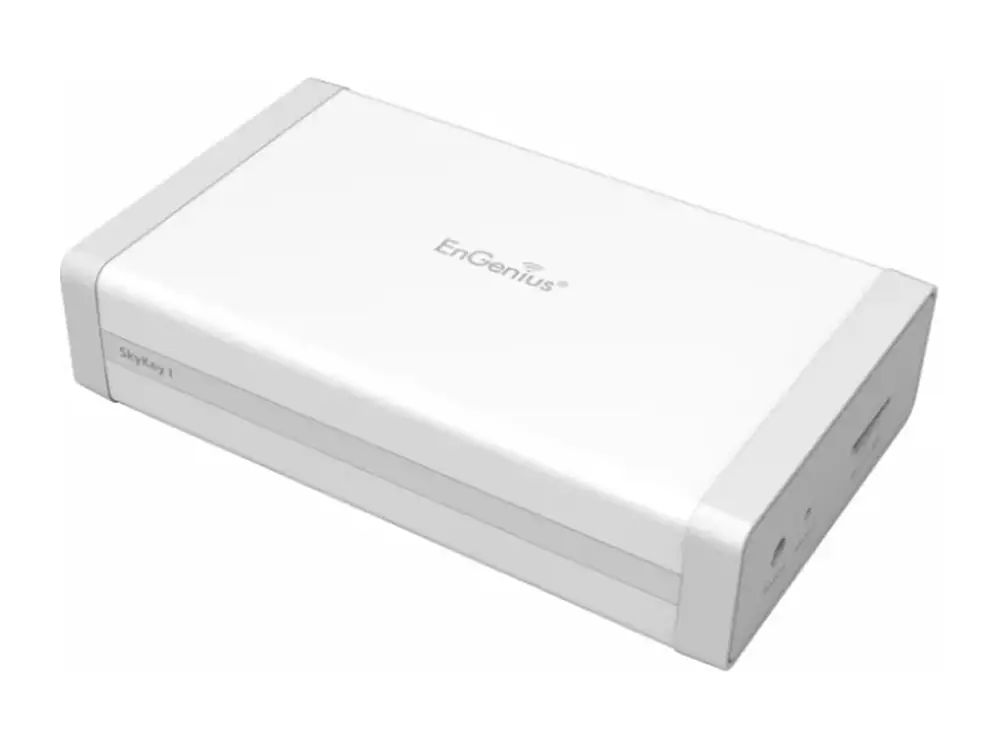
 SkyKey I
EnGenius SkyKey I Network management controller / software
On-Premises Network management Platform with built-in ezMaster software
The EnGenius SkyKey I is a network management controller / software: On-Premises Network management Platform with built-in ezMaster software. It suits managing many access points from one place and sites that need on-premises control. Vemax Distribution Sdn Bhd supplies the SkyKey I in Malaysia through resellers and system integrators, with local warranty and pre-sales support from offices in Kuala Lumpur, Kuching, Penang and Kota Kinabalu.
- Network management controller / software
Supplied by Vemax Distribution Sdn Bhd, EnGenius distributor in Malaysia, with local stock, warranty and RMA support.
Key features of the SkyKey I
- On-Premises Network management Platform with built-in ezMaster software
Best for
- Managing many access points from one place
- Sites that need on-premises control
SkyKey I overview
The SkyKey I can be deploy to manage up to 100 EnGenius Wireless Access Points and switches from both remote and local sites intuitionally and easily. The solution is also supported to power by either 802.3af/at PoE (Power Over Ethernet) or DC12V power . Built-in Qualcomm Quad-core CPU with sup-porting powerful computing for driving and boosting performance effectively. Compliance with 802.3af/at or DC12V Input power source 2 x 10/100/1000 Mbps Ethernet ports that use to network with switches or servers easily. Expanding Micro SD slot for backing up con-figuration of this SkyKey. Built-in management software to organise systemic and distributed managerial system for controlling 100 sets of EnGenius Access Points directly. Built-in 1GB DRAM and 4GB eMMC flash storage to control and to manage statistical information up to 7 days.
Product description from EnGenius.
Full technical specifications
Technical Specifications Ap
| CPU: | Model: Qualcomm IPQ4019 Architecture: 32-bit Clock Rate: ARM A7 Quad Core 717MHz Hardware Encryption Acceleration: Yes |
|---|---|
| Memory: | System Memory: 1GB DDR3 |
| Storage: | eMMC: 4GB (MLC) |
| Interfaces and LEDs | 2 x 10/100/1000 Mbps RJ45 ports (1 x PoE) 1 x Micro SD Slot 1 x DC-Input Jack 1 x Reset Button 1 x Power LED (Orange) 2 x LAN LED (Green) |
Management Features Ap
| Managing Capacity | Up to 100 devices (Access points or switches) |
|---|---|
| Reserving duration of managerial data | Maximum 7 days if users control and manage 100pcs of Access Points and switches on a SkyKey solution |
| Managed Access Points / Switches | Users can realize status of Access Points and Switches |
| System Resource Usage | CPU: Usage (%) of CPU for this SkyKey Memory: Usage (%) of Memory for this SkyKey Disk: Usage (%) of Disk for this SkyKey |
| System Overview | Users can realize ezMaster software version on this SkyKey |
| Recent Projects | Updated or revised projects are listed in the right side bar. |
| Rogue AP Detection | Enable the function to detect the fake access points in the environment. |
| Active Clients | The page will show clients’ information including client name, getting IP, MAC address, Client OS*, SSID, Band, Tx, Rx, and RSSI information. |
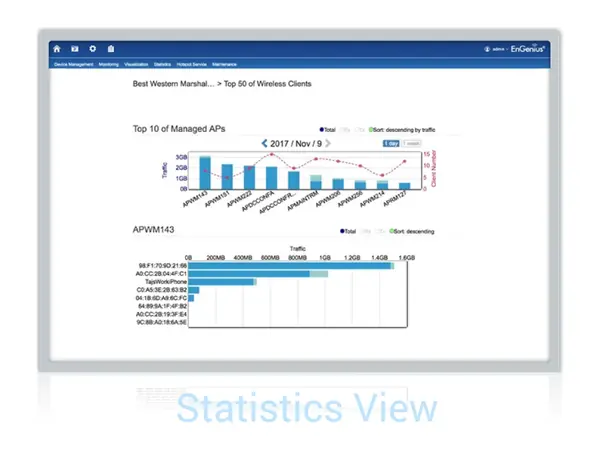
| Statistics Information Access Point | Top 10 traffic for the Managed AP. We can reserve data up to 30 days. |
| Wireless Client Information | Top Fifty (50) traffic for wireless client devices. |
| Topology View | Topology view provide a glance how all the devices is being connected with all the connecting parameters presented. In this view, network administrator can quickly identify connection faults and perform necessary troubleshooting. |
| Map View | Enter this view to find locations of Access Points or switches on global view of google map. You may also filter one of APs from google map easily. |
| Floor Plan View | Upload a floor plan for this project. Users can put a known floor plan and then place Access Points or switches on this view. |
| Mesh View | Provide a topology of the MESH Links. |
| Hotspot Service | Captive Portal profile setting will be set a profile to apply on one of SSIDs. Users can configure authentication types, session of connecting clients, redirect page types and redirect behaviour |
| System Overview | Users can realize ezMaster software version on this SkyKey |
| Recent Projects | Update or revise projects are listed in the right side bar. |
| Bulk Update | Throughout this function to proceed mass upgrade procedure on a specific AP. |
| Bulk Update (Switch) | Throughout this function to proceed mass upgrade procedure on a specific switch. |
| AP Remote Log | Synchronise clients’ information of AP to a remote log server. |
| Backup/Restore | Option 1: Backup configure files to SkyKey Option 2: Backup config files to Micro SD card Note: Save up to 5 configuration file |
Specifications from EnGenius. Subject to change by the manufacturer; check the official datasheet for the latest details.
SkyKey I questions
Where can I buy the EnGenius SkyKey I in Malaysia?
Vemax Distribution Sdn Bhd is the EnGenius distributor in Malaysia. You can buy the SkyKey I through our reseller and system integrator network in Kuala Lumpur, Selangor, Penang, Johor, Sabah and Sarawak. Contact Vemax at +60 16-874 7515 or sales@vemax.com.my and we will connect you with a reseller or quote you directly for projects.
What is the price of the EnGenius SkyKey I in Malaysia?
Pricing depends on quantity and project size. Request a quote from Vemax for the latest SkyKey I price in Malaysia. Registered resellers receive dealer pricing.
Does the SkyKey I come with a Malaysian warranty?
Yes. Units supplied by Vemax carry the official EnGenius warranty with local RMA handled in Malaysia, so there is no need to send products overseas.
Where can I download the SkyKey I datasheet?
Use the "Download datasheet" button on this page. It downloads the official PDF directly from EnGenius.
Can I become a EnGenius reseller in Malaysia?
Yes. Vemax works with IT resellers, ELV contractors and system integrators across Malaysia. Register through the contact form to get dealer pricing, demo units and technical training.